Spend less time in Meta Ads
The Meta Ads dashboard that tells you what to do.
Log in and the decisions are already made for you. Pause, scale, iterate.
Read-only access · Disconnect any time
- ad spend under management
- $2.5Mad spend under management
- identified as inefficient
- $298,000identified as inefficient
- ad accounts connected
- 132ad accounts connected
Trusted by brands running Meta Ads









What customers say
From people who stopped digging through dashboards.
It gives me the numbers I actually need across Meta, Google Analytics, and Klaviyo all on one dashboard so I can quickly see what's working, what's not, and make better decisions to keep my scaling e-commerce business profitable.
Every suggestion comes from the same playbook he used on those accounts, not generic AI guesses. Not only does it save you time, but you also know you're doing the right thing for your ad account.
How it works
Save 10 hours a week in 4 simple steps.
Connect once. Every Monday, wake up to a complete diagnosis of your Meta Ads account — with exactly what to do and why.
Connect in 90 seconds
Link your Meta Ads account with read-only access. One click, done forever.
We watch your account daily
Every night, we pull campaign, ad set, and creative performance at daily granularity.
AI runs the diagnosis
Creative fatigue detection, spend efficiency, per-unit targets — the analysis that used to take you hours.
Wake up to answers
Monday 7am: a branded report with everything you need to know and every action to take.
What the dashboard tells you
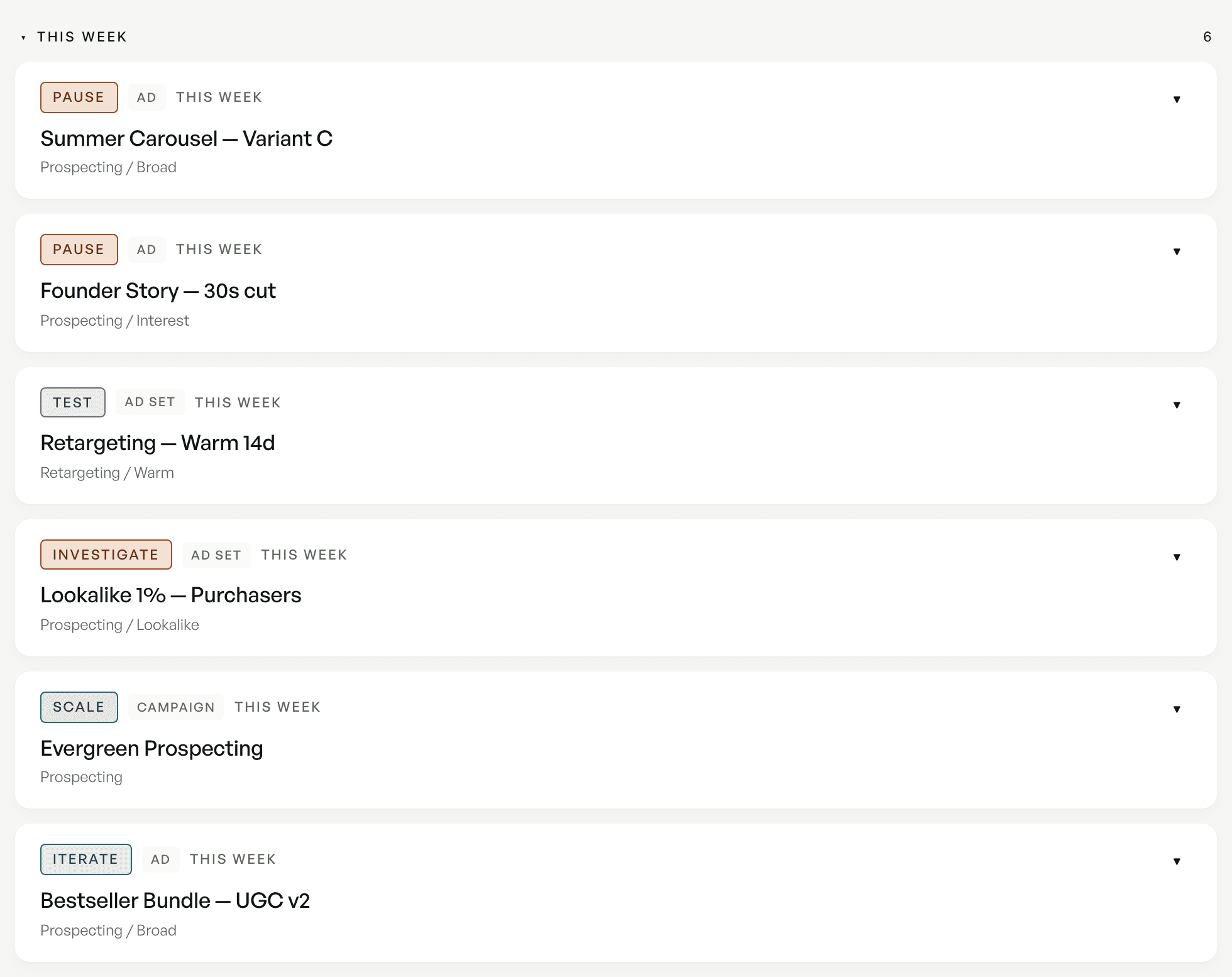
Every action you need to take. Already prioritized.
No analysis. No charts to interpret. No weekly deck to assemble. The dashboard has already done the work — you just execute what it surfaces.
Know which ad set is off target
Every item names one campaign, ad set or ad and the target it is missing — not a grade averaged across all of them.
See exactly what happened this week
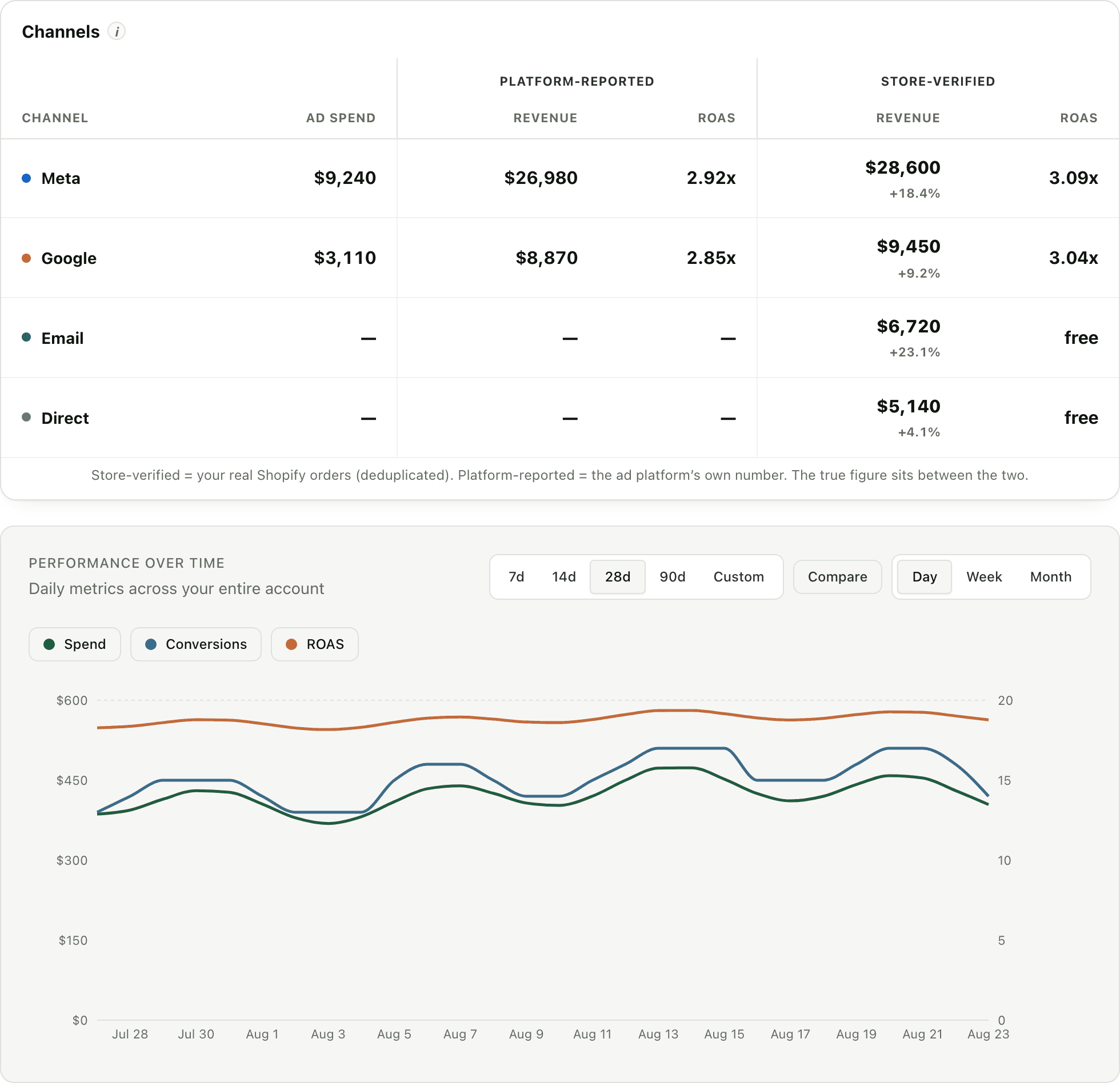
ROAS, spend, revenue, conversions, CPA, CPM, CTR, CVR — each with week-over-week change and 4-week rolling average. No spreadsheets.
Get a diagnosis, not a dashboard
A narrative written in a senior media buyer's voice explains what's driving performance — not just what the numbers are, but what they mean.
Know which campaigns to pause today
Every campaign flagged as Scaling, Stable, Watch, or Pause candidate — with the specific reason why and the dollar impact of inaction.
Catch creative fatigue before it costs you
A fatigue heatmap shows every active ad color-coded by frequency. You'll know what's tapped out and what still has room — without checking manually.
Stop spending money on your worst ads
Spend efficiency analysis tells you what percentage of your budget is going to ads below breakeven. Most accounts are surprised by the answer.
Get actions, not observations
Up to 5 urgency-ranked recommendations — Act today, This week, Monitor. Each with what to do, why, expected impact, and where.
Share a report your team actually reads
A branded PDF ready to forward to your team, your client, or your boss. No more building decks on Friday afternoon.
Where the verdict lands
We don't score your account. We name the ad set.
Your account holds prospecting, retargeting and lead-gen campaigns doing completely different jobs. Average them into one grade and you hide the only thing you needed to see. So every item names a single campaign, ad set or ad — and the target that unit is missing.
Whatever holds the budget and the optimization goal. Never the account.
CPA, ROAS, cost per lead — the metric that unit is actually buying.
No target yet? The bar comes from the unit's own best 30-day stretch, not an industry average.
Too little delivery, or a bid goal we won't price — you get told, not a number that pretends.
Act today
Retargeting · Broad 30d
Ad set · $1,840 spent this week
against its own $32.00 target
You'd know which one, and by how much, before your first sip of coffee Monday morning.
Who it's for
For anyone who's tired of paying for answers they should already have.
For DTC brands
Stop paying an agency a retainer to send you a report you could get for $199 a month.
Learn more →
For performance marketers
Reclaim the 10 hours a week you spend building reports and diagnosing accounts manually.
Learn more →
For agencies
Send every client a polished weekly report without a junior analyst spending Friday afternoon on it.
Learn more →
For in-house teams
Walk into Monday standup knowing exactly what happened, what's working, and what to do — before anyone asks.
Learn more →
How it compares
Every other tool hands you data. GoodMorning hands you the answer.
Motion, Triple Whale, Northbeam, Madgicx, Adzooma, Revealbot, Hyros, Supermetrics — every other tool gives you more dashboards, more charts, more data to interpret. GoodMorning skips that step and tells you what to do.
GoodMorning vs Motion
Creative analytics vs operational diagnosis
GoodMorning vs Triple Whale
Reporting vs ecommerce intelligence
GoodMorning vs Northbeam
Weekly report vs attribution suite
GoodMorning vs Madgicx
Reporting vs audit + auto-optimize
GoodMorning vs Adzooma
Meta depth vs multi-platform breadth
GoodMorning vs Revealbot
Diagnosis vs rule-based automation
GoodMorning vs Hyros
Operational diagnosis vs attribution truth
GoodMorning vs Supermetrics
Finished report vs data pipe
Why it's different
What your agency delivers on Friday, GoodMorning delivers on Monday — for 90% less.
Your agency charges $2,000–$5,000 a month. A big chunk of that goes to building the weekly report you skim in 3 minutes. GoodMorning does that job for $199 — and it's ready before your first meeting.
Every other tool
- —Hands you another dashboard to explore
- —Expects you to know which metrics matter this week
- —Surfaces data — you still have to diagnose it
- —You do the work of prioritizing what to act on
- —Ends with you writing the recommendations yourself
- —10 hours of analysis. Every week.
GoodMorning
- ✦Opens with action items — Act today, This week, Monitor
- ✦Every campaign and ad set already checked against its own target
- ✦Creative fatigue flagged with evidence — no guessing, no digging
- ✦Wasted spend identified and called out — with the specific fix
- ✦Zero interpretation needed — the recommendations are written for you
- ✦10 hours saved. Every week. $199 a month.
Pricing
One flat price per Meta ad account.
Full access to every GoodMorning dashboard and report.
Book a demoCancel anytimeThe smart middle ground. Save without locking in for a year.
Book a demoMost GoodMorning customers choose this planLock in the lowest price. Nearly 2.5 months free.
Book a demoCancel anytime · billed once a yearWhat is GoodMorning?
+
GoodMorning is an actionable Meta Ads dashboard that tells you exactly what to do each week. Instead of handing you another dashboard to explore, it runs the analysis automatically and surfaces a pre-diagnosed, urgency-tiered action list — Act today, This week, Monitor. You open the dashboard (or the Monday email), see the action items, and execute. No spreadsheets, no interpretation, no BI fluency required.
What does the dashboard tell me to do?
+
Up to five urgency-tiered action items every week — Act today, This week, and Monitor — each with the specific change to make, the reason, and the expected impact. The dashboard also surfaces an executive scorecard with ROAS, spend, revenue, conversions, CPA, CPM, CTR, and CVR (week-over-week and 4-week rolling), campaign-level status flags, creative performance rankings with fatigue evidence, and spend efficiency analysis. You never have to build or interpret any of it — it's pre-diagnosed and ready to execute.
Does GoodMorning score my account out of 100?
+
No, and deliberately not. An ad account holds campaigns with unrelated purposes — prospecting, retargeting, lead generation, brand — so no single number is true of all of them, and a grade averaged across them tells you nothing you can act on. GoodMorning judges the units that actually hold a budget and an optimization goal: each campaign, ad set or ad against its own target, which you set or which we learn from that unit's own best 30-day window. Account-level figures like spend, revenue and MER are reported as facts on the Overview tab, never graded.
What Meta Ads data does GoodMorning access?
+
During onboarding, you'll authorize GoodMorning to read your Meta Ads data through Facebook Login for Business. We request read-only permissions only: ads_read and business_management to read your ad-account performance, plus pages_show_list and pages_read_engagement so we can read the ad creative published through your Facebook Page — including video — for analysis. We pull daily metrics at the campaign, ad set, and ad level — spend, impressions, clicks, conversions, revenue, CTR, CVR, CPM, CPC, and frequency — along with your ad creative (images and video). We request no write or management permissions and never create, edit, or modify your campaigns.
Is my data secure?
+
Yes. We use encrypted HTTPS connections, row-level security on the database, encrypted password storage via Supabase Auth, and secure token handling for Meta access. Your raw ad data is only used to generate your reports. We do not pool your data with other customers: the cross-customer benchmark dataset was deleted in August 2026 and nothing replaced it.
How much does GoodMorning cost?
+
GoodMorning is one flat price per Meta ad account: $199/month, $179/month billed quarterly, or $159/month billed annually. Book a demo and we will walk you through the plans. You can cancel anytime from the billing page; cancellation takes effect at the end of your current billing period.
When will I see my first action list?
+
Your first full action list is populated the Monday after you complete onboarding. We start pulling your daily data immediately, so by the time Sunday's analysis runs, you have a full 7 days of performance data to diagnose against. The dashboard is live the moment you connect — but the weekly action list needs seven days of data to be meaningful.
How is GoodMorning different from Triple Whale, Motion, or Northbeam?
+
Triple Whale, Motion, and Northbeam all hand you dashboards or attribution data — you still have to do the analysis yourself. GoodMorning skips that step. We run the analysis automatically and surface a pre-diagnosed action list with exactly what to change this week. The core difference isn't delivery channel — it's that there's nothing to interpret. You see 'pause this ad set, shift this budget, refresh this creative' — not 'here's a chart, figure it out.'
Who is GoodMorning built for?
+
GoodMorning is built for performance marketers, DTC founders, ecommerce operators, in-house marketing teams, media buyers, and agencies managing Meta Ads accounts. It works best for accounts spending at least $1,000 per week, because the diagnostic becomes more valuable with higher volume.
Does GoodMorning work with Google Ads or TikTok?
+
Not yet. GoodMorning is Meta-first. We're focused on delivering the best possible Meta Ads diagnostic. Google Ads and TikTok support are on the roadmap.
Can I share the action list with my team or clients?
+
Yes. The action list is rendered as a branded PDF you can forward, download, and share. The executive summary is also copy-pasteable directly from your dashboard. Every recommendation is written in plain language so non-technical stakeholders can read it and understand the decision — no data literacy required.
Can I cancel anytime?
+
Yes. Cancel from the billing page with a single click. Cancellation takes effect at the end of your current billing period, and you'll keep receiving reports until then.
From the blog
Practical reads on Meta Ads reporting.
Frameworks, audits, and tool comparisons — see all articles. Recent reads include why your weekly Meta Ads report shows fewer clicks in 2026, our take on whether you still need a creative fatigue tool now that Meta ships native fatigue recommendations, the side-by-side on Meta Ads account health score (native vs third-party), the best Meta Ads audit tools for 2026, how often to refresh Meta Ads creative, the weekly Meta Ads report template, and the best Meta Ads reporting software for agencies ranking.
GoodMorning Review: What It Does, Who It's For
A GoodMorning review from the founder who built it: what the weekly Meta Ads action list includes, what it costs, who should buy it, and who should not.
9 min read
Meta Ads Update October 2026: The Agent Acts
Meta ads update October 2026: Meta's AI assistant moves from writing analysis to taking actions in your ad account. What is live, what is still a test.
12 min read
Meta Marketing API Rate Limits and Free Tiers
Meta Marketing API rate limits are a score, not a call count. Limited access allows 60 points per 300 seconds, Full access 9,000. Here is the quota math.
9 min read
Coupler.io vs Supermetrics for Meta Reporting
Coupler.io vs Supermetrics for Meta Ads reporting: $32/mo against $55/mo, what each covers after Meta's 2026 field changes, and what you still build.
10 min read
Significant Edits and the Learning Phase
Significant edits and the learning phase, decoded: which Meta Ads changes reset delivery, which ones don't, and why the 20% budget rule isn't Meta's.
12 min read
AgencyAnalytics Alternatives: The Client Math
AgencyAnalytics alternatives compared by pricing model, not feature lists: where $20-per-client billing stops scaling and what to price against it.
9 min read
Get your Monday mornings back.
Connect your Meta Ads account tonight. Monday at 7am, you'll have everything you need — without lifting a finger.
Read-only access · Disconnect any time